分享海报
背景
最近有一个小程序项目,使用uniapp开发,需要增加分享图片功能 希望分享时之分享图片过去
实现
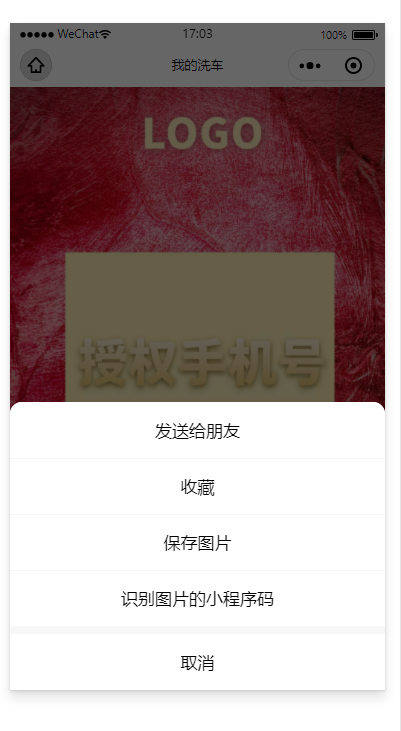
如图所示,在长按图片时弹出如下菜单
具体实现
需要保存的图片使用canvas绘制,使用uni.canvasToTempFilePath生成本地图片
1. 创建canvas画布
<template>
	<view>
		<view  class="canvas-box" >
			<canvas class="canvas" canvas-id="shareImg" :style="{width: width +'px',height: height+'px',zIndex: 100}">
			</canvas>
		</view>
		<image v-if="imgUrl" class="img" :src="imgUrl" mode="aspectFit" show-menu-by-longpress='1' :style="{width: width +'px',height: height+'px'}"></image>
	</view>
</template>
获取手机数据以适应屏幕及分辨率倍数
2. 获取手机数据
uni.getSystemInfo({
	success(res) {
		_this.width = res.screenWidth;
		_this.height = res.screenHeight;
		_this.num = res.pixelRatio
		}
	});
3. 下载图片的本地临时缓存
async downFilePath() { //下载图片
    let _this = this;
    this.$tool.uniShowLoading({
      title: "加载中"
    })
    //下载二维码图片
    const qrCode = await new Promise(function(resolve, reject) {
      uni.downloadFile({
        url: _this.qr,
        success(res) {
          _this.qrPath = res.tempFilePath
          resolve(res);
        },
        fail(err) {
          reject(err);
          console.log(err, 'downqr')
        }
      })
    })
    //下载背景图片
    const bg = await new Promise(function(resolve, reject) {
      uni.downloadFile({
        url: _this.bg,
        success: result => {
          _this.bgPath = result.tempFilePath;
          resolve(result)
        },
        fail(err) {
          reject(err);
          console.log(err, 'getbg');
        }
      })
    })
    this.getImgInfo().catch(err => {
      console.log('getImgInfo', err)
    })
  },
4. 获取图片信息
async getImgInfo() { //获取图片信息
				let _this = this;
				//二维码信息
				const qrInfo = await new Promise(function(resolve, reject) {
					uni.getImageInfo({
						src: _this.qrPath,
						success(res) {
							resolve(res);
						},
						fail(err) {
							reject(err)
						}
					})
				});
				//背景图片信息
				const bgInfo = await new Promise(function(resolve, reject) {
					uni.getImageInfo({
						src: _this.bgPath,
						success(res) {
							resolve(res);
						}
					})
				});
				this.create(bgInfo, qrInfo).catch(err => {
					console.log('create', err)
				})
			},
5. 开始绘制并生成图片
使用canvasToTempFilePath生成图片时会边模糊,所以需要给导出尺寸deswidth,desheight乘以手机的pixelRatio级别
async create(bg, qr) {
				let _this = this;
				const ctx = uni.createCanvasContext('shareImg'); //canvas上下文
				//绘制背景图
				ctx.drawImage(bg.path, 0, 0, _this.width, _this.height);
				ctx.drawImage(qr.path, 129.5, 451, qr.width, qr.height);
				ctx.draw()

				//生成图片
				setTimeout(function() {
					console.log('--createLoading')
					_this.$tool.uniHideLoading()
					uni.canvasToTempFilePath({
						canvasId: 'shareImg',
						width: _this.width,
						height: _this.height,
						destWidth: _this.width * _this.num,//图片模糊的处理办法*pixelRatio
						destHeight: _this.height * _this.num,
						success: function(res) {
							_this.imgUrl = res.tempFilePath;
						},
						fail(err) {
							console.log(err)
						}
					})
				}, 1000)
			},
在微信小程序中将image组件设置show-menu-by-longpress=’1’属性就可以实现长按保存,识别二维码,以及转发功能
所以可以隐藏canvas组件并将canvasToTempFilePath返回的地址给image组件。 canvas设置display:none时canvasToTempFilePath将不能成功生成图片所以可以使用 position:fixed;left:100%;